
In this tutorial you deploy a complete bedrock tenant on your machines, check that it is healthy and secure, and open its dashboards. It takes about 45 minutes, most of it waiting for the bootstrap.
#What you need
- Three machines running Debian 12, each with at least 4 vCPU, 12 GB of RAM and 200 GB of disk, and more RAM if you turn on event buses. Virtual machines are fine.
- SSH access to each machine with a key, for a user that has passwordless
sudo. - A controller: any Linux machine that can reach every node over SSH and reach GitHub, since the bootstrap downloads the bundled operators on the controller. Your laptop works.
- Network access from the nodes to GitHub and the container registries, to download releases and images.
#Get the code
On the controller, clone the repository and install the controller’s dependencies:
git clone https://github.com/sassendes/bedrock.git
cd bedrock
sudo ./tenant-workload/bootstrap/dependencies/ansible_deps.sh
This installs Ansible, the Python Kubernetes client and the kubernetes.core collection.
#Describe your machines
Copy tenant-workload/bootstrap/hosts.example.ini to tenant-workload/bootstrap/hosts.ini, open the copy and replace the placeholders with your machines. Git ignores hosts.ini, so your real addresses and key paths never end up in a commit. The first node creates the cluster and the other two join it.
[server_init]
node1 ansible_host=10.0.0.11 ansible_user=debian ansible_ssh_private_key_file=~/.ssh/bedrock

[server_join]
node2 ansible_host=10.0.0.12 ansible_user=debian ansible_ssh_private_key_file=~/.ssh/bedrock
node3 ansible_host=10.0.0.13 ansible_user=debian ansible_ssh_private_key_file=~/.ssh/bedrock

[rke2_servers:children]
server_init
server_join
Check that Ansible can reach every node:
ansible -i tenant-workload/bootstrap/hosts.ini rke2_servers -m pingEach node should answer with pong.
#Deploy
make deployThe bootstrap prepares the nodes, installs RKE2, then installs the platform layer by layer. Here is what each stage does:
- Nodes. Packages, kernel settings and the audit policy, then RKE2 on the first node and on the other two.
- Admission. Namespaces, priority classes and Kyverno with its policies, so every later pod is checked.
- Storage. Longhorn, then Garage and its buckets.
- Databases. cluster-1, its first backup, then the replica clusters restored from that backup.
- Services. Monitoring, logging, alerting, dashboards, Falco and Reloader.
- Policy. The network policies last, followed by a check that every namespace has one.
On a slow connection the first run spends a long time pulling images. If it stops on a timeout, run make deploy again. The bootstrap is safe to run more than once and continues from where the cluster is.
When it finishes, the admin kubeconfig is in ~/.bedrock/kubeconfig on the controller. Point kubectl at it:
export KUBECONFIG=~/.bedrock/kubeconfig#Check that everything runs
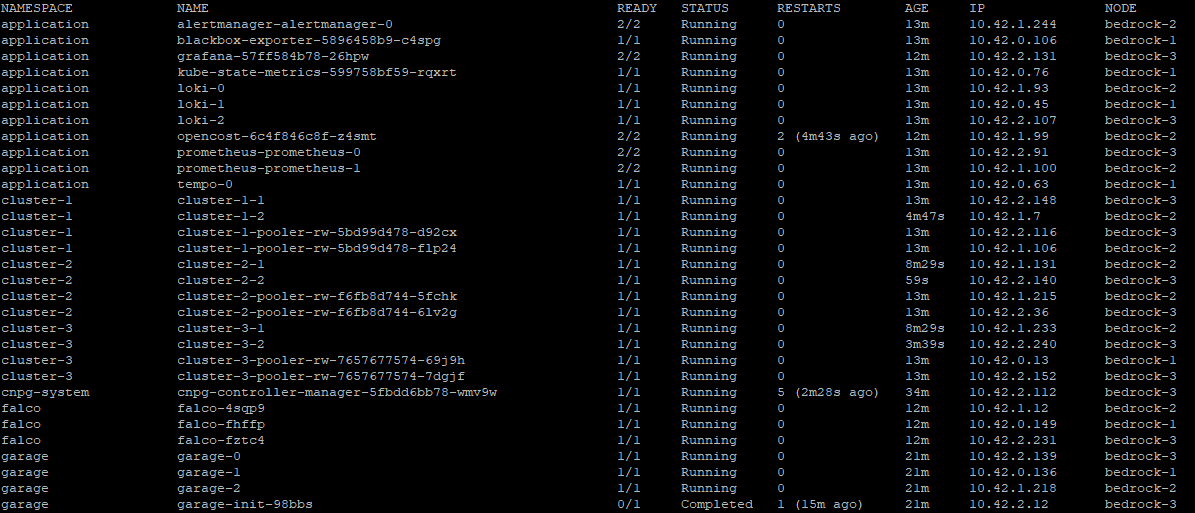
kubectl get pods -AEvery pod should be Running, apart from a few Completed install jobs in kube-system.
#Check that it is locked down
List the network policies:
kubectl get cnp,ccnp -AYou should see one CiliumNetworkPolicy per namespace and one cluster-wide policy, cluster-default-deny, all with VALID set to True.
Then run the CIS benchmark on one of the nodes:
curl -sSLO https://github.com/aquasecurity/kube-bench/releases/download/v0.16.0/kube-bench_0.16.0_linux_amd64.tar.gz
tar xzf kube-bench_0.16.0_linux_amd64.tar.gz
./kube-bench run --config-dir ./cfg --benchmark rke2-cis-1.9 --skip 4.3.1
Every check in the summary should pass except one, check 5.1.6, which is expected; the security model explains why. Check 4.3.1 is skipped because it tests kube-proxy, which this cluster does not run.
#Open Grafana
Dashboards are not exposed outside the cluster. Forward Grafana’s port to the controller:
kubectl -n application port-forward svc/grafana 3000:3000Open http://localhost:3000 and log in as admin with the password in ~/.bedrock/grafana-admin on the controller. The node and database dashboards are already loaded.
#What you built
You now have a tenant cluster where:
- every pod starts with all traffic denied and only named flows are open
- images are pinned by digest and checked against an allowlist before they run
- PostgreSQL runs as a primary with synchronous replication, a live replica and a delayed replica, all backed up to encrypted S3
- metrics, logs, traces and audit events are collected and alert rules watch them
#Next steps
- Read inside a tenant cluster to see how the parts fit together.
- Turn on an event bus with turn on an event bus.
- When you are done, remove everything with tear down a tenant.